Lately I've been looking at Lab Streaming Layer (LSL) for a client. LSL is an open-source cross-platform software framework for collecting time-series measurements that handles the networking, time-synchronization, collection, viewing, and recording of data. Their docs are pretty good and they have plenty of examples in their github repository. This blog post probably won't teach you anything you couldn't get from the docs, but I just felt like writing some notes on my experiences with it.
They have arm64, amd64, and x86 files for various operating systems pre-built in their GitHub Release page. So if you're on one of the supported systems, the easiest thing to do is download one of their packages.
I prefer building from source, so I downloaded the tarball for version 1.16.2 and unpacked it.
They include a script standalone_compilation_linux.sh that can handle compiling the library for you.
$ ./standalone_compilation_linux.sh
The script assumes the source tarball is a repository, so it reports a fatal error when it calls git.
+ git describe --tags HEADfatal: not a git repository (or any of the parent directories): .git+ echo
This doesn't seem to matter as the script continues anyway.
+ g++ -fPIC -fvisibility=hidden -O2 -Ilslboost -DBOOST_ALL_NO_LIB -DASIO_NO_DEPRECATED -DLOGURU_DEBUG_LOGGING=0 -DLSL_LIBRARY_INFO_STR="built from standalone build script" src/api_config.cpp src/buildinfo.cpp src/cancellation.cpp src/common.cpp src/consumer_queue.cpp src/data_receiver.cpp src/info_receiver.cpp src/inlet_connection.cpp src/lsl_inlet_c.cpp src/lsl_outlet_c.cpp src/lsl_resolver_c.cpp src/lsl_streaminfo_c.cpp src/lsl_xml_element_c.cpp src/netinterfaces.cpp src/resolve_attempt_udp.cpp src/resolver_impl.cpp src/sample.cpp src/send_buffer.cpp src/socket_utils.cpp src/stream_info_impl.cpp src/stream_outlet_impl.cpp src/tcp_server.cpp src/time_postprocessor.cpp src/time_receiver.cpp src/udp_server.cpp src/util/cast.cpp src/util/endian.cpp src/util/inireader.cpp src/util/strfuns.cpp thirdparty/pugixml/pugixml.cpp -Ithirdparty/pugixml thirdparty/loguru/loguru.cpp -Ithirdparty/loguru -Ithirdparty/asio lslboost/serialization_objects.cpp -shared -o liblsl.so -lpthread -lrt -ldlIn file included from /usr/include/c++/12/bits/stl_algobase.h:64,from /usr/include/c++/12/memory:63,from thirdparty/asio/asio/detail/memory.hpp:21,from thirdparty/asio/asio/execution/detail/as_invocable.hpp:20,from thirdparty/asio/asio/execution/execute.hpp:20,from thirdparty/asio/asio/execution/executor.hpp:20,from thirdparty/asio/asio/execution/allocator.hpp:20,from thirdparty/asio/asio/execution.hpp:18,from thirdparty/asio/asio/any_io_executor.hpp:22,from thirdparty/asio/asio/basic_socket_acceptor.hpp:19,from thirdparty/asio/asio/ip/tcp.hpp:19,from src/socket_utils.h:4,from src/time_receiver.h:4,from src/time_receiver.cpp:1:/usr/include/c++/12/bits/stl_pair.h: In instantiation of ‘constexpr std::pair<typename std::__strip_reference_wrapper<typename std::decay<_Tp>::type>::__type, typename std::__strip_reference_wrapper<typename std::decay<_Tp2>::type>::__type> std::make_pair(_T1&&, _T2&&) [with _T1 = double&;_T2 = double&;typename __strip_reference_wrapper<typename decay<_Tp2>::type>::__type = double;typename decay<_Tp2>::type = double;typename __strip_reference_wrapper<typename decay<_Tp>::type>::__type = double;typename decay<_Tp>::type = double]’:src/time_receiver.cpp:176:40: required from here/usr/include/c++/12/bits/stl_pair.h:741:5: note: parameter passing for argument of type ‘std::pair<double, double>’ when C++17 is enabled changed to match C++14 in GCC 10.1741|make_pair(_T1&&__x, _T2&&__y)
|^~~~~~~~~+ gcc -O2 -Iinclude testing/lslver.c -o lslver -L. -llsl+ LD_LIBRARY_PATH=. ./lslverLSL version: 116built from standalone build script2415.792841
The build completed for me and created a shared library named liblsl.so and an executable named lslver in the folder. lslver just tells you the version of your LSL and how it was made.
LSL uses Stream Outlets to transmit time-series data over a local network.
You can potentially have many stream outlets transmitting over your network, so outlets have metadata (names, content-type, format type, source-id, etc ) to help you pick the streams you want to listen to.
I use lsl::stream_info to specify the metadata for an LSL stream.
// Create stream info with custom metadata for channel names
constsize_t channelCount =5; lsl::stream_info streamInfo("ExampleDoubleStream",// Stream Name - Describe the device here
"RandomValues",// Content Type of the Stream.
channelCount,// Channels per Sample
1,// Sampling Rate (Hz)
lsl::cf_double64,// Format/Type
"c++source987456"// SourceID (Make Unique)
);
Note that streams consist of a single format type (floats, ints, strings, etc) and have a known number of channels per sample. In my example I set the channels per sample to 5 and set the format to double.
After you have your meta data ready, use it to create a stream_outlet
lsl::stream_outlet streamOutlet(streamInfo);
The outlet will transmit the stream metadata to all devices on the local network using UDP multicast. This lets any program or device interested in the streams find them.
Sending data is easy. You just call push_sample() with the data you want to send
// setup random samples for outlet stream
std::vector<double>sample(channelCount);... streamOutlet.push_sample(sample);
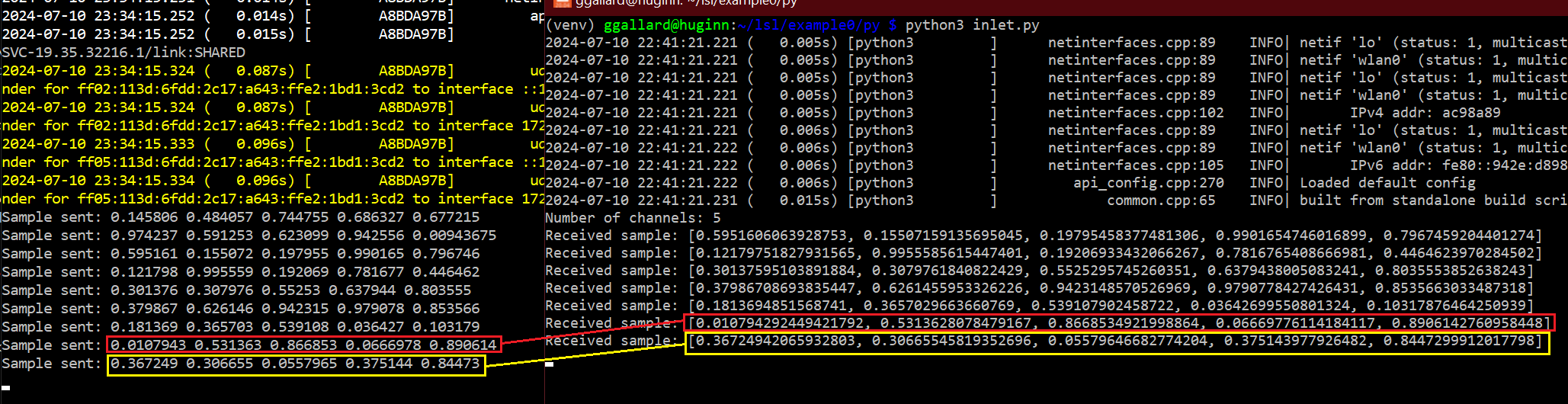
The following code is a simple C++ example that continuously sends 5 channels of random doubles.
#include<iostream>#include<vector>#include<random>#include<thread>// for sleep#include<lsl_cpp.h>intmain(intargc,char*argv[]){// Create stream info with custom metadata for channel names
constsize_t channelCount =5; lsl::stream_info streamInfo("ExampleDoubleStream",// Stream Name
"RandomValues",// Content Type
channelCount,// Channels per Sample
1,// Sampling Rate (Hz)
lsl::cf_double64,// Format/Type
"c++source987456"// SourceID (Make Unique)
); lsl::stream_outlet streamOutlet( streamInfo );// setup random samples for outlet stream
std::vector<double>sample(channelCount); std::random_device rd; std::mt19937 gen(rd()); std::uniform_real_distribution<>uni(0.0,1.0);while(true){// fill sample vector with random values.
for(auto&val : sample ){ val =uni(gen);} streamOutlet.push_sample(sample);// print sample for verification
std::cout <<"Sample sent: ";for(constauto&val : sample){ std::cout << val <<"";} std::cout << std::endl;// Sleep for 1 second.
std::this_thread::sleep_for(std::chrono::seconds(1));}return0;}
The equivalent in Python looks like this:
importrandomimporttimefrompylslimportStreamInfo,StreamOutlet# Create stream_info with mixed channels: 2 for numeric (double and int), 1 for string
channel_count=5info=StreamInfo('ExampleDoubleStream','RandomValues',channel_count,1,'double64','pysourceid814709')# Create an outlet
outlet=StreamOutlet(info)whileTrue:# Fill sample with random values
sample=[random.random()for_inrange(5)]# Send the sample
outlet.push_sample(sample)print(f"samples send: {sample}")# Sleep for 1 second
time.sleep(1)
Now that we have a stream outlet, we need a way to read it in. LSL provides stream inlets for this purpose.
We'll need to get the stream_info in order to create a stream_inlet. The lsl::resolve function is used to search for LSL outlets on your network.
std::vector<lsl::stream_info> streamInfo =lsl::resolve_stream("name",// property (name, type, source_id, desc/manufacture
"ExampleDoubleStream",// value the property should have
1,// minimum number of streams
lsl::FOREVER // timeout
);
LSL will look at UDP multicast messages to find streams matching your search criteria. In my case, I"m looking for outlet streams with the name 'ExampleDOubleStream'. You might get several streams with this name, so lsl::resolve_stream() returns a vector of stream_info.
Note I used "name" to search for my outlet, but content-type ("type") is the preferred way to find streams on your network.
When reading a stream, you'll need to know how many channels each sample has. You can get this from the stream info with the channel_count() method.
Once you have the channel count, you can allocate enough space for the sample and read it with pull_sample()
std::vector<double>sample(channelCount);// Pull a sample from the inlet
streamInlet.pull_sample(sample);
The following code is a simple C++ example that continuously reads 5 channels from our random stream of double values.
#include<iostream>```c++#include<cmath>#include<iostream>#include<vector>#include<thread>#include<lsl_cpp.h>intmain(intargc,char*argv[]){// Look for streams
std::vector<lsl::stream_info> streamInfo =lsl::resolve_stream("name",// property (name, type, source_id, desc/manufacture
"ExampleDoubleStream",// value the property should have
1,// minimum number of streams
lsl::FOREVER // timeout
); std::cout <<"Found "<< streamInfo.size()<<" streams\n";if( streamInfo.size()==0){ std::cerr <<"No streams found. Exiting.\n";return-1;}size_t channelCount = streamInfo[0].channel_count(); std::cout <<"Channel Count: "<< channelCount << std::endl;// Create an inlet to receive data
lsl::stream_inlet streamInlet(streamInfo[0]);// Buffer to hold the received sample data
std::vector<double>sample(channelCount);while(true){// Pull a sample from the inlet
streamInlet.pull_sample(sample);// Print the received sample
std::cout <<"Received sample: ";for(constauto&val : sample){ std::cout << val <<"";} std::cout << std::endl;}return0;}
The python equivalent is
frompylslimportStreamInlet,resolve_stream# Resolve the stream
streams=resolve_stream('name','ExampleDoubleStream',1,0)# Create an inlet
inlet=StreamInlet(streams[0])# Retrieve the stream info to get the number of channels
info=inlet.info()num_channels=info.channel_count()print(f"Number of channels: {num_channels}")whileTrue:# Pull a sample from the inlet
sample, timestamp=inlet.pull_sample()# Print the received sample
print(f"Received sample: {sample}")
Unfortunately streams appear to be restricted to a single type only. Their docs state:
All data within a stream is required to have the same type (integers, floats, doubles, strings).
This feels restrictive to me, but I imagine it helps with efficiency and multi-language support.
I work with eye trackers (and other data sources) for my day job. So the data streams I normally work with often have more than one type of data. So this restriction is less than ideal. Their solution appears to be to create multiple streams and
For a simple test I'll pretend I have an eye-tracker that sends:
The 3d position of a gaze (GazeOriginX, GazeOriginY, and GazeOriginZ) represented by three double values
the 3d direction of a gaze (GazeDirectionX, GazeDirectionY, and GazeDirectionZ) represented by three double values
The 2D location where the gaze intersects a computer monitor (IntersectionX, IntersectionY) represented by two double values.
The numeric index of the Display the Subject is currently looking at (assuming multiple monitors, 1,2 or 3)
The name of the Display
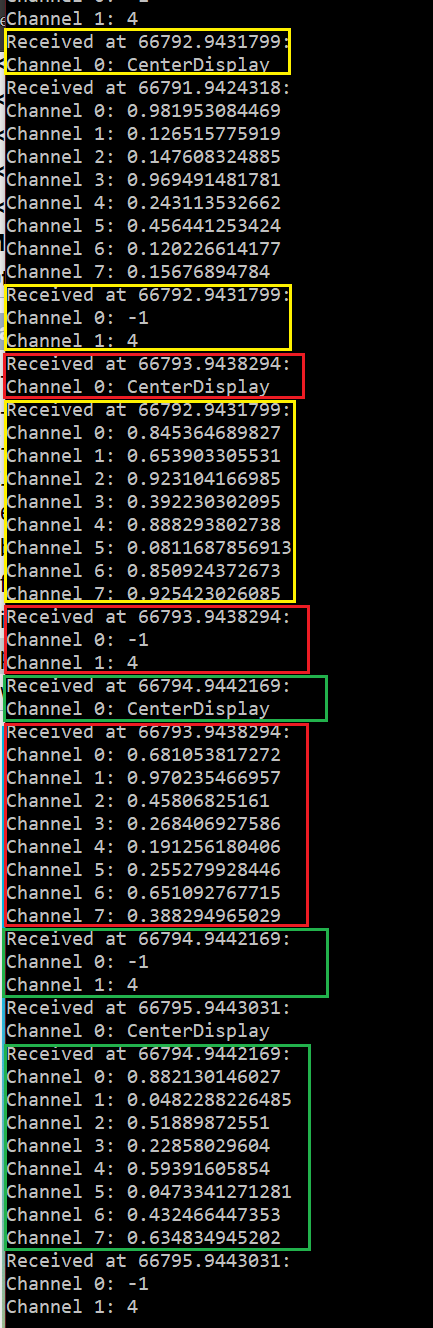
This gives us 8 doubles, a single int, and a string. Normally I'd pack all of the data into a JSON string or even a binary blob to transmit it, but I can't do this in LSL. So instead I'll make 3 streams and push them all with the same LSL timestamp
The following code creates 3 streams with meta data describing the channels and continuously transmit them.
#include<cmath>#include<iostream>#include<vector>#include<thread>#include<random>#include<lsl_cpp.h>intmain(intargc,char**argv){// Create stream info with custom metadata for channel names
// initialize a vector of strings with channel names
constsize_t numFloats =8; lsl::stream_info lslGazeFloatInfo("EyeTrackingFloatData","Gaze", numFloats, LSL_IRREGULAR_RATE, lsl::cf_float32); std::vector<float>lslGazeFloatValues(numFloats);// Add channel names to metadata
lsl::xml_element channels = lslGazeFloatInfo.desc().append_child("channels"); channels.append_child("channel").append_child_value("label","IntersectionX"); channels.append_child("channel").append_child_value("label","IntersectionY"); channels.append_child("channel").append_child_value("label","HeadPosX"); channels.append_child("channel").append_child_value("label","HeadPosY"); channels.append_child("channel").append_child_value("label","HeadPosZ"); channels.append_child("channel").append_child_value("label","HeadDirectionX"); channels.append_child("channel").append_child_value("label","HeadDirectionY"); channels.append_child("channel").append_child_value("label","HeadDirectionZ");constsize_t numInts =2; lsl::stream_info lslGazeIntInfo("EyeTrackingIntData","Gaze", numInts, LSL_IRREGULAR_RATE, lsl::cf_int64); std::vector<int64_t>lslGazeIntValues(numInts); lslGazeIntValues[0]=-1; lslGazeIntValues[1]=4; lsl::xml_element intChannels = lslGazeIntInfo.desc().append_child("channels"); intChannels.append_child("channel").append_child_value("label","FrameNumber"); intChannels.append_child("channel").append_child_value("label","IntersectionObjectIndex");// Create stream info with custom metadata for channel names
lsl::stream_info lslGazeStringInfo("EyeTrackingStringData","Gaze",1, lsl::IRREGULAR_RATE, lsl::cf_string); lsl::xml_element objectNameChannels = lslGazeStringInfo.desc().append_child("channels"); objectNameChannels.append_child("channel").append_child_value("label","intersectionObjectName"); lsl::stream_outlet lslGazeFloatOutlet(lslGazeFloatInfo); lsl::stream_outlet lslGazeIntOutlet(lslGazeIntInfo); lsl::stream_outlet lslGazeStringOutlet(lslGazeStringInfo); std::random_device rd; std::mt19937 gen(rd()); std::uniform_real_distribution<>uni(0.0,1.0);while(true){// fill sample vector with random values.
for(auto&val : lslGazeFloatValues ){ val =(float)uni(gen);} std::string message ="CenterDisplay";// send all samples with a timestamp
double timestamp =lsl::local_clock(); lslGazeFloatOutlet.push_sample(lslGazeFloatValues, timestamp); lslGazeIntOutlet.push_sample(lslGazeIntValues, timestamp); lslGazeStringOutlet.push_sample(&message, timestamp);// Sleep for a while before sending the next sample
std::this_thread::sleep_for(std::chrono::seconds(1));}return0;}
The equivalent in python looks like this:
importtimeimportrandomfrompylslimportStreamInfo,StreamOutlet,local_clock# Create stream info with custom metadata for channel names
num_floats=8lsl_gaze_float_info=StreamInfo('EyeTrackingFloatData','Gaze',num_floats,0,'float32')# Add channel names to metadata
channels=lsl_gaze_float_info.desc().append_child('channels')channels.append_child('channel').append_child_value('label','IntersectionX')channels.append_child('channel').append_child_value('label','IntersectionY')channels.append_child('channel').append_child_value('label','HeadPosX')channels.append_child('channel').append_child_value('label','HeadPosY')channels.append_child('channel').append_child_value('label','HeadPosZ')channels.append_child('channel').append_child_value('label','HeadDirectionX')channels.append_child('channel').append_child_value('label','HeadDirectionY')channels.append_child('channel').append_child_value('label','HeadDirectionZ')num_ints=2lsl_gaze_int_info=StreamInfo('EyeTrackingIntData','Gaze',num_ints,0,'int64')int_channels=lsl_gaze_int_info.desc().append_child('channels')int_channels.append_child('channel').append_child_value('label','FrameNumber')int_channels.append_child('channel').append_child_value('label','IntersectionObjectIndex')lsl_gaze_string_info=StreamInfo('EyeTrackingStringData','Gaze',1,0,'string')object_name_channels=lsl_gaze_string_info.desc().append_child('channels')object_name_channels.append_child('channel').append_child_value('label','intersectionObjectName')# Create stream outlets
lsl_gaze_float_outlet=StreamOutlet(lsl_gaze_float_info)lsl_gaze_int_outlet=StreamOutlet(lsl_gaze_int_info)lsl_gaze_string_outlet=StreamOutlet(lsl_gaze_string_info)lsl_gaze_float_values=[random.random()for_inrange(num_floats)]lsl_gaze_int_values=[random.randint(0,1000)for_inrange(num_ints)]message="CenterDisplay"whileTrue:# Send the samples
lsl_gaze_float_outlet.push_sample(lsl_gaze_float_values)lsl_gaze_int_outlet.push_sample(lsl_gaze_int_values)lsl_gaze_string_outlet.push_sample([message])# Sleep for a while before sending the next sample
time.sleep(1)
To read the eye tracking data, I make 3 inlets. One for each outlet stream.
#include<cmath>#include<iostream>#include<vector>#include<thread>#include<iomanip>#include<lsl_cpp.h>intmain(intargc,char**argv){try{// Resolve the stream
std::vector<lsl::stream_info> floatResults =lsl::resolve_stream("name","EyeTrackingFloatData",1,5.0); std::cout <<"Found "<< floatResults.size()<<" float streams"<< std::endl; std::vector<lsl::stream_info> intResults =lsl::resolve_stream("name","EyeTrackingIntData",1,5.0); std::cout <<"Found "<< intResults.size()<<" int64 streams"<< std::endl; std::vector<lsl::stream_info> stringResults =lsl::resolve_stream("name","EyeTrackingStringData",1,5.0); std::cout <<"Found "<< stringResults.size()<<" string streams"<< std::endl;if(floatResults.empty()|| intResults.empty()|| stringResults.empty()){ std::cerr <<"Missing a stream"<< std::endl;return1;}// Create inlets for the streams
lsl::stream_inlet floatInlet(floatResults[0]); lsl::stream_info floatInfo = floatInlet.info(); std::cout <<"The float stream's XML meta-data is: \n"<< floatInfo.as_xml(); lsl::stream_inlet intInlet(intResults[0]); lsl::stream_info intInfo = intInlet.info(); std::cout <<"The int64 stream's XML meta-data is: \n"<< intInfo.as_xml(); lsl::stream_inlet stringInlet(stringResults[0]); lsl::stream_info stringInfo = stringInlet.info(); std::cout <<"The string stream's XML meta-data is: \n"<< stringInfo.as_xml(); std::cout << std::fixed; std::cout <<std::setprecision(7);while(true){// Buffer to hold the received data
std::vector<float>floatSamples(8);// Pull sample from the inlet
double timestamp = floatInlet.pull_sample(floatSamples.data(), floatSamples.size());// Print the received data
std::cout <<"Received at "<< timestamp <<":\n";for(size_t i =0; i < floatSamples.size();++i){ std::cout <<"Channel "<< i <<": "<< floatSamples[i]<< std::endl;}// same for int
std::vector<int64_t>intSamples(2); timestamp = intInlet.pull_sample(intSamples.data(), intSamples.size()); std::cout <<"Received at "<< timestamp <<":\n";for(size_t i =0; i < intSamples.size();++i){ std::cout <<"Channel "<< i <<": "<< intSamples[i]<< std::endl;} std::vector < std::string>stringSamples(1); timestamp = stringInlet.pull_sample(stringSamples.data(), stringSamples.size()); std::cout <<"Received at "<< timestamp <<":\n";for(size_t i =0; i < stringSamples.size();++i){ std::cout <<"Channel "<< i <<": "<< stringSamples[i]<< std::endl;}// Sleep for a short duration to simulate processing time
std::this_thread::sleep_for(std::chrono::milliseconds(10));}}catch(std::exception& e){ std::cerr <<"Error: "<< e.what()<< std::endl;return1;}return0;}
The python equivalent looks like:
frompylslimportStreamInlet,resolve_streamimporttimetry:# Resolve the streams
float_results=resolve_stream('name','EyeTrackingFloatData',1,5.0)print(f"Found {len(float_results)} float streams")int_results=resolve_stream('name','EyeTrackingIntData',1,5.0)print(f"Found {len(int_results)} int64 streams")string_results=resolve_stream('name','EyeTrackingStringData',1,5.0)print(f"Found {len(string_results)} string streams")ifnotfloat_resultsornotint_resultsornotstring_results:print("Missing a stream")exit(1)# Create inlets for the streams
float_inlet=StreamInlet(float_results[0])float_info=float_inlet.info()print(f"The float stream's XML meta-data is: \n{float_info.as_xml()}")int_inlet=StreamInlet(int_results[0])int_info=int_inlet.info()print(f"The int64 stream's XML meta-data is: \n{int_info.as_xml()}")string_inlet=StreamInlet(string_results[0])string_info=string_inlet.info()print(f"The string stream's XML meta-data is: \n{string_info.as_xml()}")whileTrue:# Buffer to hold the received data
float_samples, timestamp=float_inlet.pull_sample()print(f"Received at {timestamp}:")fori,sampleinenumerate(float_samples):print(f"Channel {i}: {sample}")# Same for int
int_samples, timestamp=int_inlet.pull_sample()print(f"Received at {timestamp}:")fori,sampleinenumerate(int_samples):print(f"Channel {i}: {sample}")# Same for string
string_samples, timestamp=string_inlet.pull_sample()print(f"Received at {timestamp}:")fori,sampleinenumerate(string_samples):print(f"Channel {i}: {sample}")# Sleep for a short duration to simulate processing time
time.sleep(0.01)exceptExceptionase:print(f"Error: {e}")exit(1)