
4 minutes reading time
I've been looking at Lab Streaming Layer (LSL) lately. It's a relatively easy way to send and read data over a local network. In my previous post I worked with one stream. In this post I use multiple streams. Two Raspberry Pis streaming data with outlets and a single PC reading both streams with an inlet.
One problem with having multiple networked sources is time-synchronization. Devices clocks may not be synchronized to a common time server and drift can occur between time updates. If the time between clock updates is sufficiently large, the data streams will be out of sync.
LSL's docs state that it does not perform time synchronization by default. Instead it gives you information to synchronize it yourself. This information consists of
To try this out, I'll have two stream outlets running on two different Raspberry Pis with slightly different system times. A third machine will have an inlet listening to both outlets. This third machine will check the timestamps of both stream samples and their offset correction values.
To test out the time correction, I'd like the two network sources to send out a message at the same time. One way to do this is to send the message on a common signal.
The built in GPIO pins on a raspberry pi make it easy to detect when a switch is closed. A single switch will be connected to both devices simultaneously. When the switch is closed the two outlet scripts will send a message with their system times through LSL.
To make the time difference between machines larger, I'm stopping time synchronization on one of the Pis:
and manually setting the time to be over a minute behind the other.
The circuit is very simple. One contact of the switch is connected to GPIO-26 on both Raspberry Pis. The other contact is connected to ground on both.
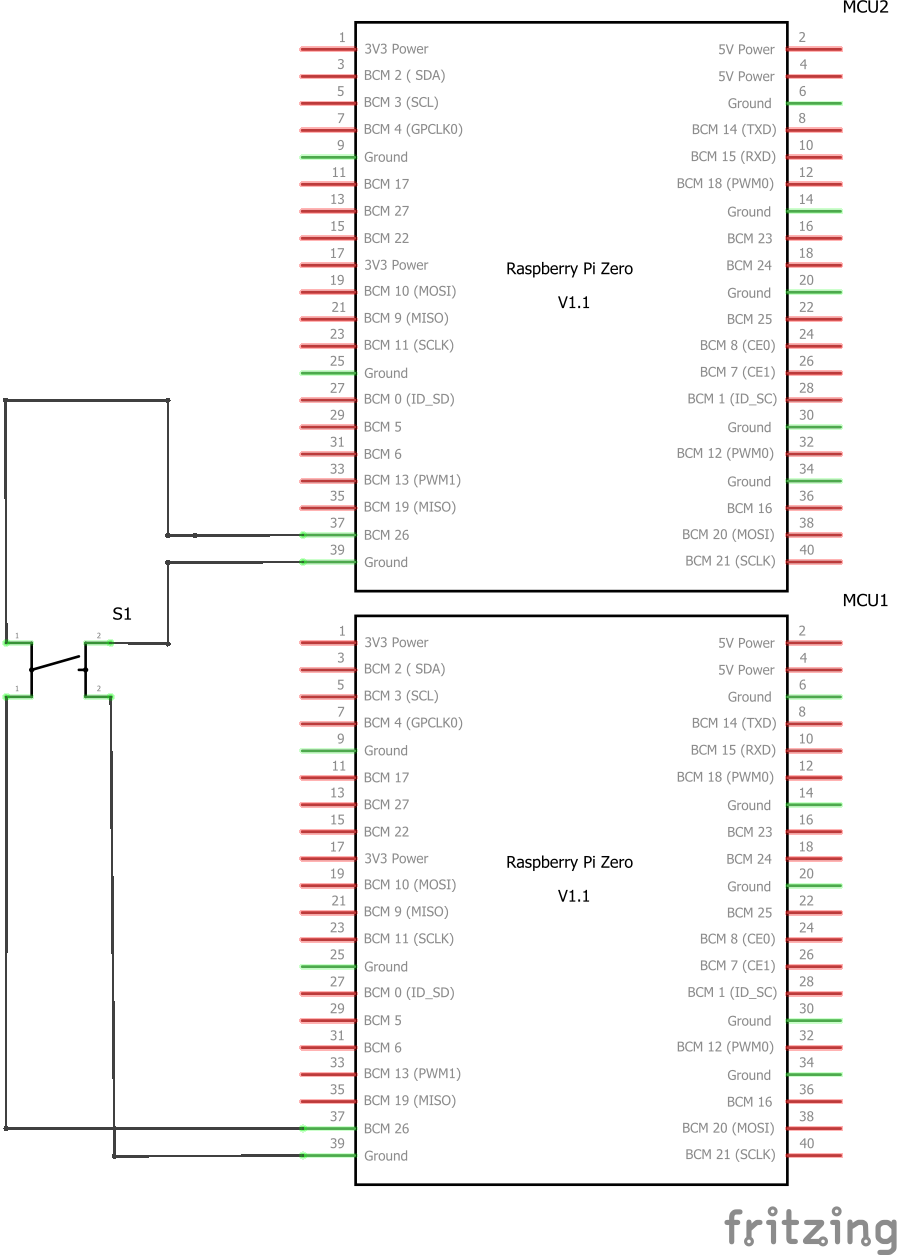 When the switch is closed pin 26 gets pulled low, which can easily be detected by a python script.
I've run into problems with the default python GPIO library on Raspbian so instead I've installed rpi-lgpio
The code to detect the pin and send a sample is simple. I'll use wait_for_edte() to wait for a GPIO pin to fall and get the system and LSL local clock times immediately.
# python timestamp
=
# LSL timestamp
=
From there, the timestamps can be converted to a string and sent through the outlet
= + + + +
The complete code is:
#!/usr/bin/env python3
= 26
=
=
# python timestamp
=
# LSL timestamp
=
= + + + +
# delay to filter/debounce
Pressing the switch triggers both instances and they publish their system times
time_correction()The third machine reads samples with the inlet's pull_sample() method.
double timestamp = inlet->;
The time offsets are also read from the inlet using the time_correction() method.
double timeCorrection = inlet->;
This value can be added to the sample timestamp to synchronize the time to the local machine.
std::cout << "Timestamp: " << timestamp << " time correction: " << timeCorrection << " corrected time: " << timestamp + timeCorrection << ":\n";
The completed code is here:
void
int
Each stream is read in its own thread and values are printed out as soon as they come in.
Output looks pretty good:
) [|
) [|
) [|
) [|
) [|
) [|
) [|
) [|
) [|
) [|
<?xml version="1.0"?>
<info>
<name>TriggerStream</name>
<type>Custom</type>
<channel_count>1</channel_count>
<channel_format>string</channel_format>
<source_id>str_source_00002</source_id>
<nominal_srate>0 <version>1 <created_at>5053 <uid>fb29d72e-362b-4a79-a8dc-8e6a56d48832</uid>
<session_id>default</session_id>
<hostname>muninn</hostname>
<v4address <v4data_port>16572</v4data_port>
<v4service_port>16572</v4service_port>
<v6address <v6data_port>16573</v6data_port>
<v6service_port>16573</v6service_port>
<desc </info>
The actual data strings show the times on the outlet machines are off by over a minute ( 16:53:01 vs 16:51:45 )
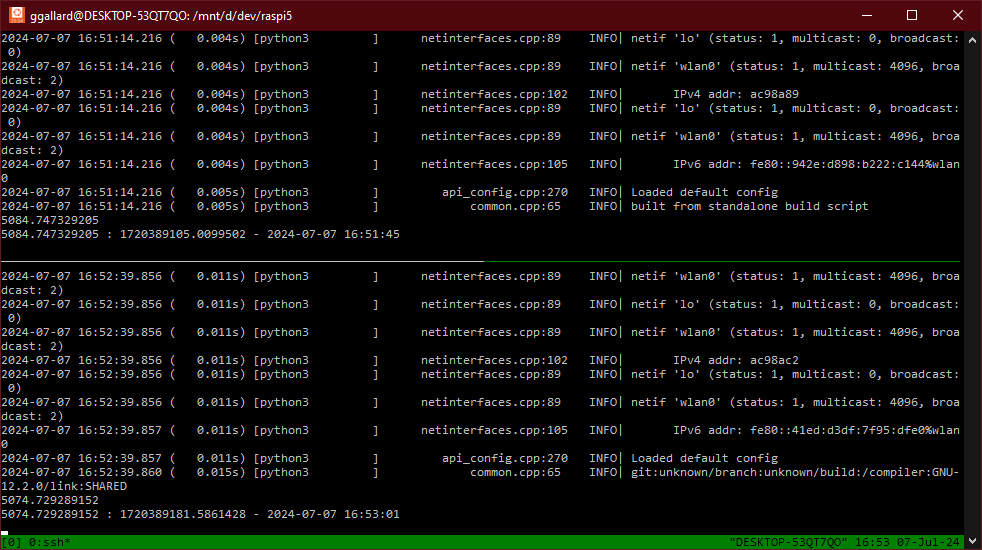
I pressed the switch several times and got the following results:
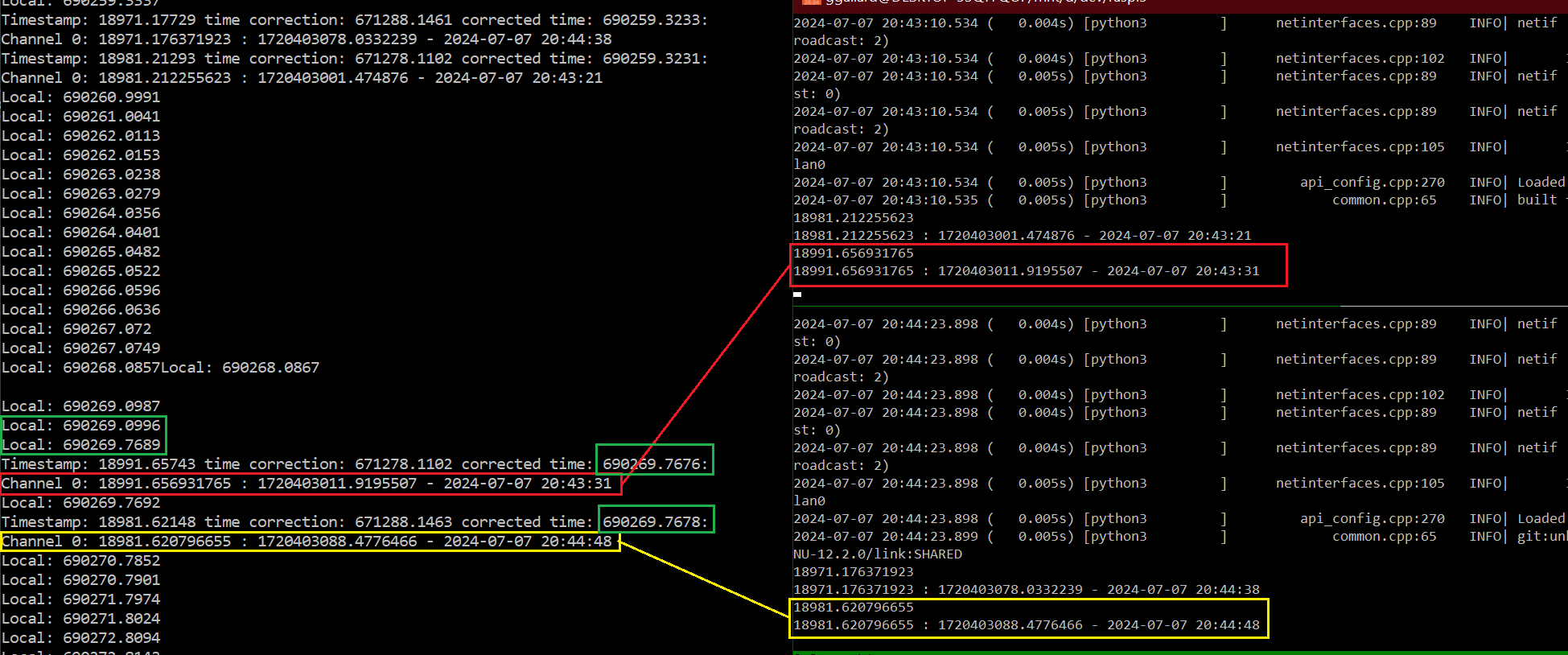
The first thing that stands out for me is the difference between LSL's local clock on Windows and Linux
On Windows I call `lsl::local_clock()
double localTimestamp = ;
std::cout << << "Local: " << localTimestamp << std::endl;
with output times in the 690K range.
On Linux I call pylsl's local_clock
...
=
= + + + +
Which has times in around 18K. Which is very different from Windows. Their FAQ covers this.
LSL’s lsl_local_clock() function uses std::chrono::steady_clock::now().time_since_epoch(). This returns the number of seconds from an arbitrary starting point. The starting point is platform-dependent – it may be close to UNIX time, or the last reboot – and LSL timestamps cannot be transformed naively to wall clock time without special effort.
The documentation also points out that
In general, it is not possible to synchronize LSL streams with non-LSL clocks (e.g., wall clock, UNIX time, device without an LSL integration) unless there is a separate solution for this.
That's OK though. What really matters is the corrected time from all sources are as close as possible. In my case, the times get translated to the Windows time value (as it's the listener).
The correct values are very close: 690269.7676 vs 690269.7678. Much better than the minute difference between the two Raspberry Pis.